
Save Money on Custom DTF Transfers
A step-by-step guide for small businesses, Etsy sellers, clothing brands, and print shops that want to maximize DTF gang sheet space and lower transfer costs.
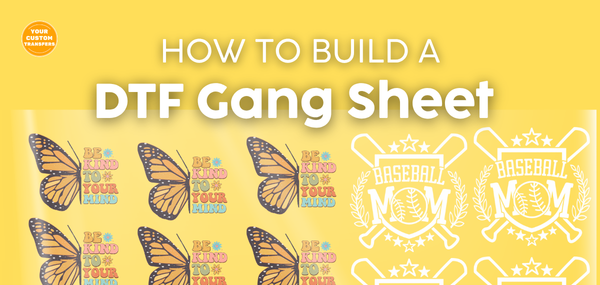
If you’re ordering custom DTF transfers, learning how to make a DTF gang sheet is one of the easiest ways to save money, reduce waste, and streamline your apparel production.
A DTF gang sheet allows you to place multiple designs, logos, names, numbers, and graphics on a single sheet so you can print more in one order. Whether you run a clothing brand, Etsy shop, print shop, school spirit wear business, or custom t-shirt business, gang sheets can help you get more value from every order.
What Is a DTF Gang Sheet?
A DTF gang sheet is a print layout that combines multiple designs onto one transfer sheet. Instead of ordering each design separately, you group artwork together to maximize space, reduce cost, and improve production efficiency.
Gang sheets are commonly used for custom t-shirts, hoodies, tote bags, school spirit wear, team apparel, business logo shirts, boutique apparel, and small batch clothing drops.
Common Uses
- Clothing brands and Etsy sellers
- Print shops and apparel decorators
- School spirit wear and team apparel
- Left chest, sleeve, and full front designs
- Multiple sizes of the same print
Key Benefits
- Save money by using more sheet space
- Print multiple designs at once
- Reduce wasted transfer material
- Organize custom orders more efficiently
- Scale small business apparel production
DTF Gang Sheet Sizes
Choosing the right DTF gang sheet size depends on how many designs you need, how large each print is, and whether you are ordering for testing, small batches, or bulk production.
| Gang Sheet Size | Best Production Use |
|---|---|
| 22" x 48" | Smaller runs, samples, and testing new designs |
| 22" x 96" | Larger layouts, multiple customer orders, and design bundles |
| 22" x 120" | Bulk orders, apparel drops, and maximizing value |
| 22" x 144" | High-volume production, print shops, and wholesale-style orders |
What Size DTF Gang Sheet Do I Need?
One of the most common questions we receive is, “What size gang sheet should I order?” The answer depends on how many designs you need, the size of each transfer, and whether you’re ordering for a single project or ongoing production.
To make it easier, we created a free DTF Gang Sheet Sizer that helps estimate the best gang sheet size for your artwork.
Whether you’re creating custom shirts, team apparel, spirit wear, business logo shirts, or clothing brand merchandise, our gang sheet calculator can help you maximize space and avoid ordering a sheet that’s too small or too large.
How to Make a DTF Gang Sheet Step by Step
Set Up Your Canvas
Choose your gang sheet size, such as 22" x 48", 22" x 96", 22" x 120", or 22" x 144". Not sure which size is right? Use our Gang Sheet Sizer to estimate the best sheet size for your project. Set up your canvas in Canva, Photoshop, Illustrator, or another design tool using 300 DPI and a transparent background.
Upload High-Resolution Artwork
Use high-resolution PNG files with transparent backgrounds whenever possible. Avoid blurry graphics, screenshots, low-quality logos, and artwork with jagged edges because those issues may show in the final transfer.
Arrange Designs to Maximize Space
Place designs close together while leaving enough room to cut them apart. Rotate smaller graphics, group similar sizes together, and fill open spaces with pocket logos, sleeve prints, names, numbers, or small add-on designs.
Check Sizing Before You Export
Make sure each design is sized correctly for the garment. Common print sizes include left chest logos, full front designs, youth shirt designs, sleeve prints, and oversized back prints.
Export and Order Your Gang Sheet
Export your finished file as a transparent PNG at 300 DPI, then upload it to order your ready-to-press DTF transfers. If you are unsure about the layout, you can also have your designs ganged for you.
Common DTF Gang Sheet Mistakes to Avoid
Common Mistakes
- Using low-resolution images
- Forgetting transparent backgrounds
- Leaving too much empty space
- Using incorrect print sizing
- Making text too thin or too small
- Not checking artwork before upload
Pro Tips for Better Results
- Design at actual print size
- Use 300 DPI artwork
- Keep text bold enough to print
- Fill empty spaces with small graphics
- Test new designs before bulk orders
- Save a copy of each gang sheet layout
Who Should Use DTF Gang Sheets?
DTF gang sheets are useful for anyone who regularly orders custom transfers or wants to lower the cost per design.
- Etsy sellers creating seasonal shirts, boutique designs, or personalized apparel
- Print shops handling short runs, overflow jobs, and customer orders
- Small businesses creating branded shirts, uniforms, and promotional apparel
- School and team sellers producing spirit wear, fundraiser shirts, and team apparel
- Clothing brands testing new designs, limited drops, and logo placements
Frequently Asked Questions About DTF Gang Sheets
What is a DTF gang sheet?
A DTF gang sheet is a single transfer sheet that includes multiple designs, logos, names, or graphics arranged together to save space and reduce cost.
How do I make a gang sheet for DTF transfers?
Choose a gang sheet size, set up a transparent 300 DPI canvas, upload high-resolution artwork, arrange your designs to maximize space, then export the file as a transparent PNG.
What size should my DTF gang sheet be?
The best size depends on how many designs you need. Smaller sheets work well for samples and short runs, while larger sheets are better for bulk orders, apparel drops, and print shop production.
How do I know what size gang sheet to order?
The easiest way is to use a DTF gang sheet calculator. Our Gang Sheet Sizer helps estimate the best gang sheet size based on your artwork dimensions and quantity, helping you maximize sheet space and reduce transfer costs.
Can you make my gang sheet for me?
Yes. If you do not want to build the layout yourself, you can upload your artwork and have your designs arranged into a gang sheet for easier ordering.
Do DTF gang sheets save money?
Yes. Gang sheets can help lower your cost per design because you use more of the available sheet space instead of ordering each transfer separately.
What file type should I use for a DTF gang sheet?
A transparent PNG at 300 DPI is commonly recommended for DTF gang sheets. High-resolution artwork helps produce cleaner, sharper transfers.
Final Thoughts on DTF Gang Sheets
Learning how to make a gang sheet for DTF transfers can save you money, improve efficiency, reduce waste, and help you scale your custom apparel business faster.
Whether you build your own layout or let our team gang your designs for you, using DTF gang sheets is one of the smartest ways to order ready-to-press transfers for t-shirts, hoodies, school spirit wear, team apparel, boutique clothing, and small business orders.